Building a Multi-agent research group (part 1)
For a while, I was looking into a system to manage my reading. Conference papers, book chapters, blog posts, and mildly interesting LinkedIn posts seemed to fill most of my open tabs on my phone, tablet, and browser. So much so that I have almost a weekly ritual to just closing these papers without even looking, thinking I won't miss them. Then, inevitably, I randomly remember reading something about a topic and, of course, the paper is closed and never to be found.
Since grad school, I have been using a combination of Papers and Zotero,, and I even created my own at some point, since none of the ones available at the time had an Emacs plugin. Alas, my workflow has changed significantly since then, since I hardly ever get to use Emacs anymore. Also, sadly, the quality of some of the software itself has degraded to the point of not justifying the price tag. A little while ago, I made the switch to Paperpile and really loved its browser extension, PDF reader, and iPad app. However, as things started looking up again, I discovered I could never build a habit out of it. The UI was too clunky, and I could never get it to sync to Overleaf, no matter how many times I tried. Very quickly, instead of a reference management system, it became a repository of unread papers, one a bit better than a simple text file filled with links.
As a side note, this has nothing to do with Paperpile itself, which I highly recommend, but mostly with my own way of reading or consuming content online more generally.
Second, a more personal aside: I recently came back from my parental leave. I took an extended leave, spending time with my family back home in Greece, renovating a house we bought there a while back, and watching our little one grow up and learn about the world around him. As importantly, I made a very conscious choice to remove all work-related stuff from my phone, turn off my work laptop, and stop my compulsive need to check for papers.
Naturally, though, when I came back to work, I felt very disconnected from what was going on. I started by reading papers in my newsletter, and halfway through the first one, I embarrassingly realised I could not understand what it was even about. It seemed that five months had rendered me completely clueless about the stuff that I had been working on for years. This was a bad situation I was in; things progress so fast these days, and dread took over that I won't be able to catch up now.
Luckily, the initial shock passed a little while later, and I eventually managed to understand what I was reading (for what it's worth, this was the paper that caused me to re-evaluate my career). I then imported the article to my Paperpile, and I had another sudden glimpse of horror: about 120 papers I had saved before I left but never read. To make matters worse, 300+ messages and notifications on Slack (admittedly, irrelevant, but they contributed to my sense of dread). At the risk of sounding patronizing, this seemed like an opportunity. One upside of coming back was that I wasn't tied to a very specific project I needed to work on, which gave me some time to explore. We live in an era where things are being built very quickly.
> I want to build a reference management system
So I started building my own solution. The problem seemed easy enough, and I thought I knew enough to build something like this, so I enlisted the help of my new friend Claude, and together we thought we could do it. To be honest, I'm not 100% sure where this was going at first. Was it going to be a reference management system? A reference finder? Would I need to add AI capabilities? Speaking of capabilities, there were many I wanted, many I thought I wanted, some I absolutely needed, and, of course, some I thought I needed. There was a lot of back-and-forth here, but in the end, I found a nice set of capabilities that balances cost and what I actually use -meaning there were a lot of fun ones I never even interacted with. Claude also proposed a name for this: Arcana. I liked the mystical sound of it, so I went with that. I have to say I had a lot of fun working on this, so if someone else finds it useful, I would be very happy.
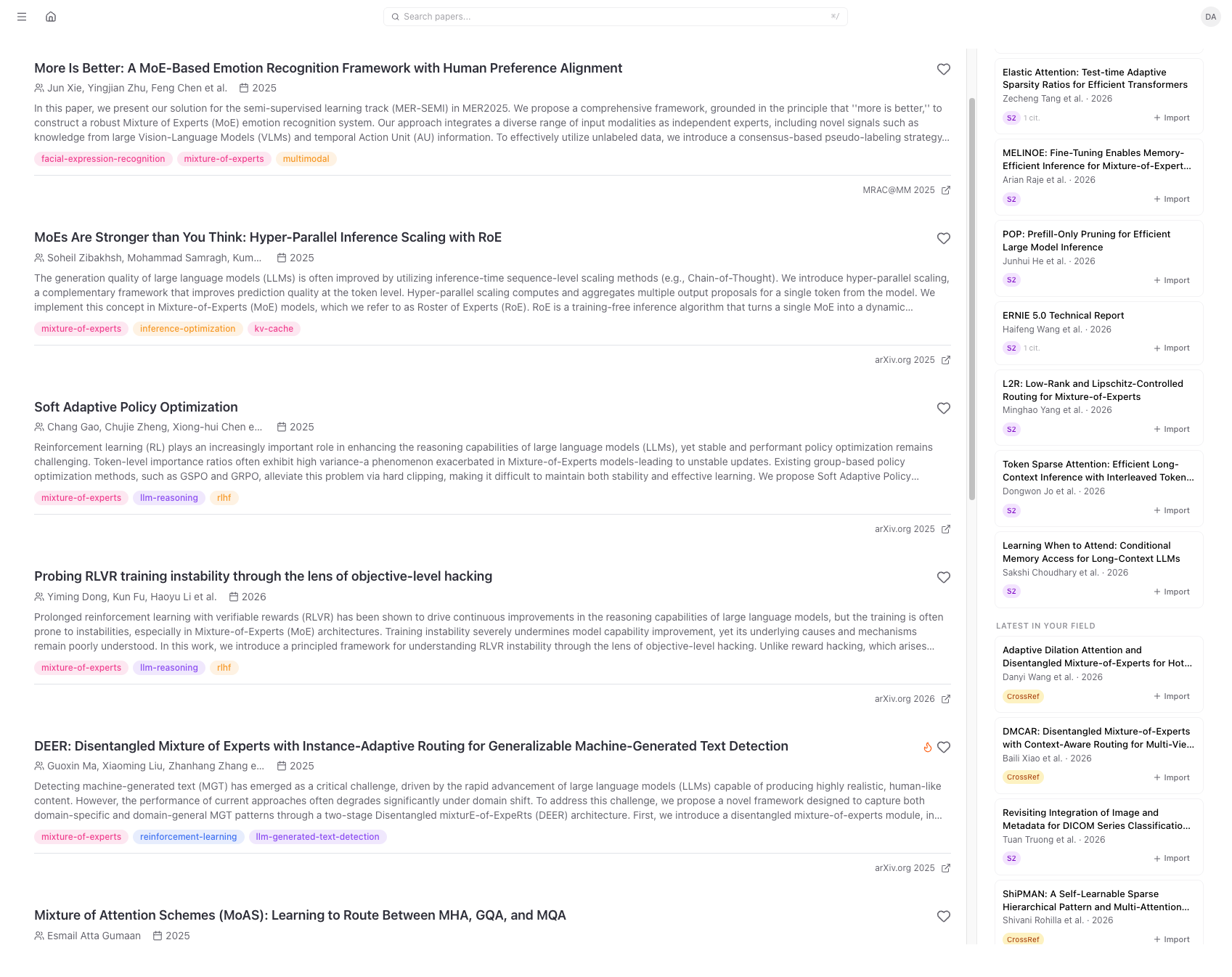 Arcana's dashboard showing papers in my library, recommended as well as the latest papers on topics I am interested in. My interests are automatically inferred from the contents of my library.
How I read papers
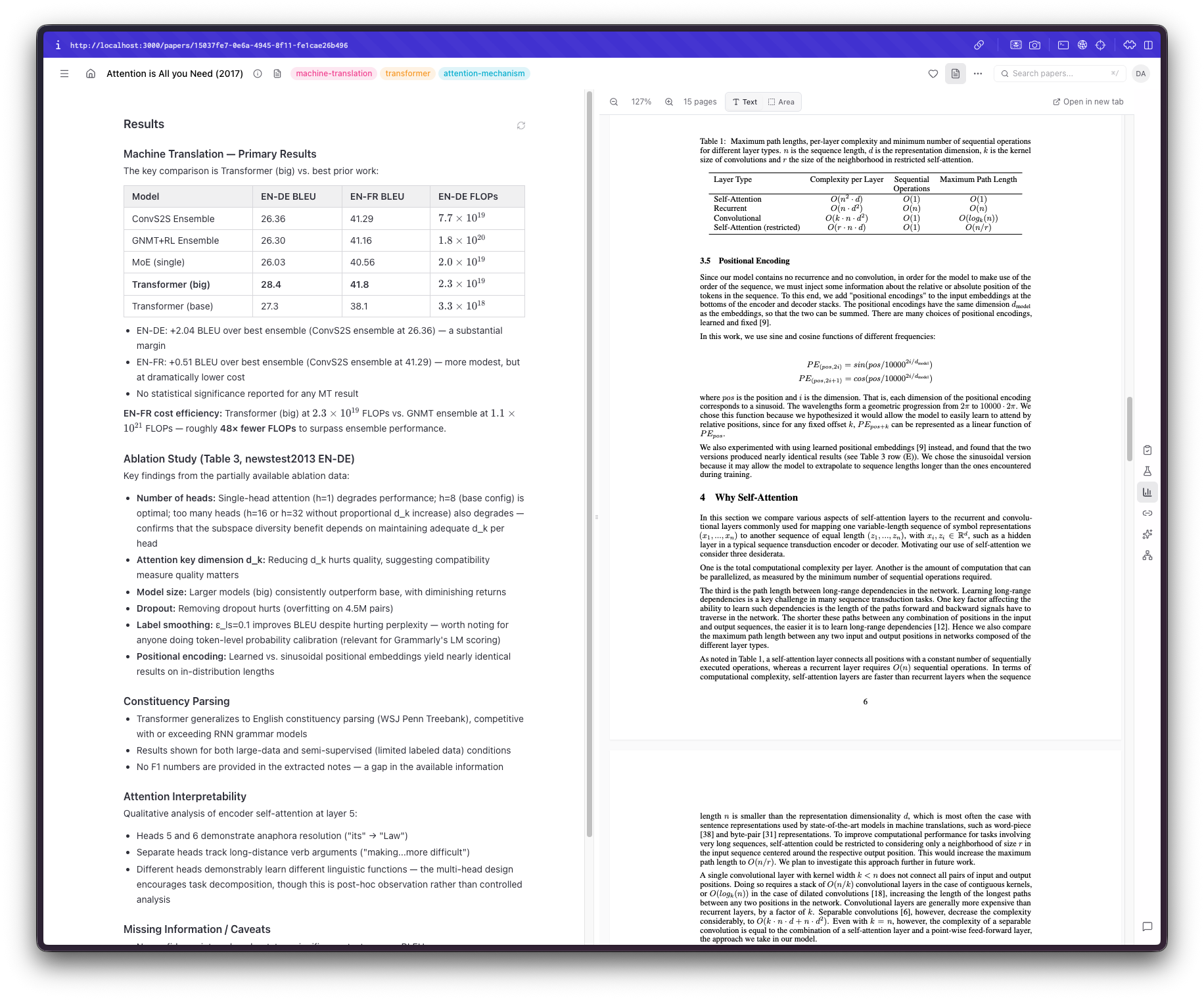
The first problem I faced was a rather basic one: what exactly didn't I like about all the solutions I tried before? It could be the interface itself, ease of use, or missing capabilities. So I started by thinking, "Would I want to focus on when reading a paper?" Claude came up with many suggestions, most of which I did not like, to be honest. What I wanted was to quickly understand the paper's scope and decide whether I'm actually interested, have a code sample (or something similar) of their methodology, and have a way to verify the contents to avoid hallucinations or bad parsing of tables, figures, or text. In the end, I settled on three sections: a review section with a summary, highlights, and the paper's novelty. Claude also added an assessment section, which I kinda liked until I put my papers there, and now I'm inclined to remove it. A methodology section that includes code snippets, the datasets, the models, and the math used. Admittedly, this part I was the most interested in; I could do with the summary or the highlights, but understanding exactly what the authors did in the sorts of papers I usually read is more important.* Finally, a results section. Depending on the depth of the paper, this can be the easiest and hardest thing for an LLM to do. I don't think there's anything inherently difficult here, but the results in these papers are usually split across multiple sections, include ablations, require context, include tables and figures, and so on. That being said, the most basic of results are almost always there and correctly displayed. I thought that if I needed something more, I could refer back to the paper.
This brought me to the next feature I wanted to add. A built-in PDF viewer that would seamlessly fit in the UI. Back when I was using Papers, I absolutely loved this interaction, so I thought it was a must-have. Building it, however, proved to be trickier than I thought. There are so many things that can go wrong when parsing a PDF, displaying it as an iframe, selecting text, auto-resizing, and the list goes on.
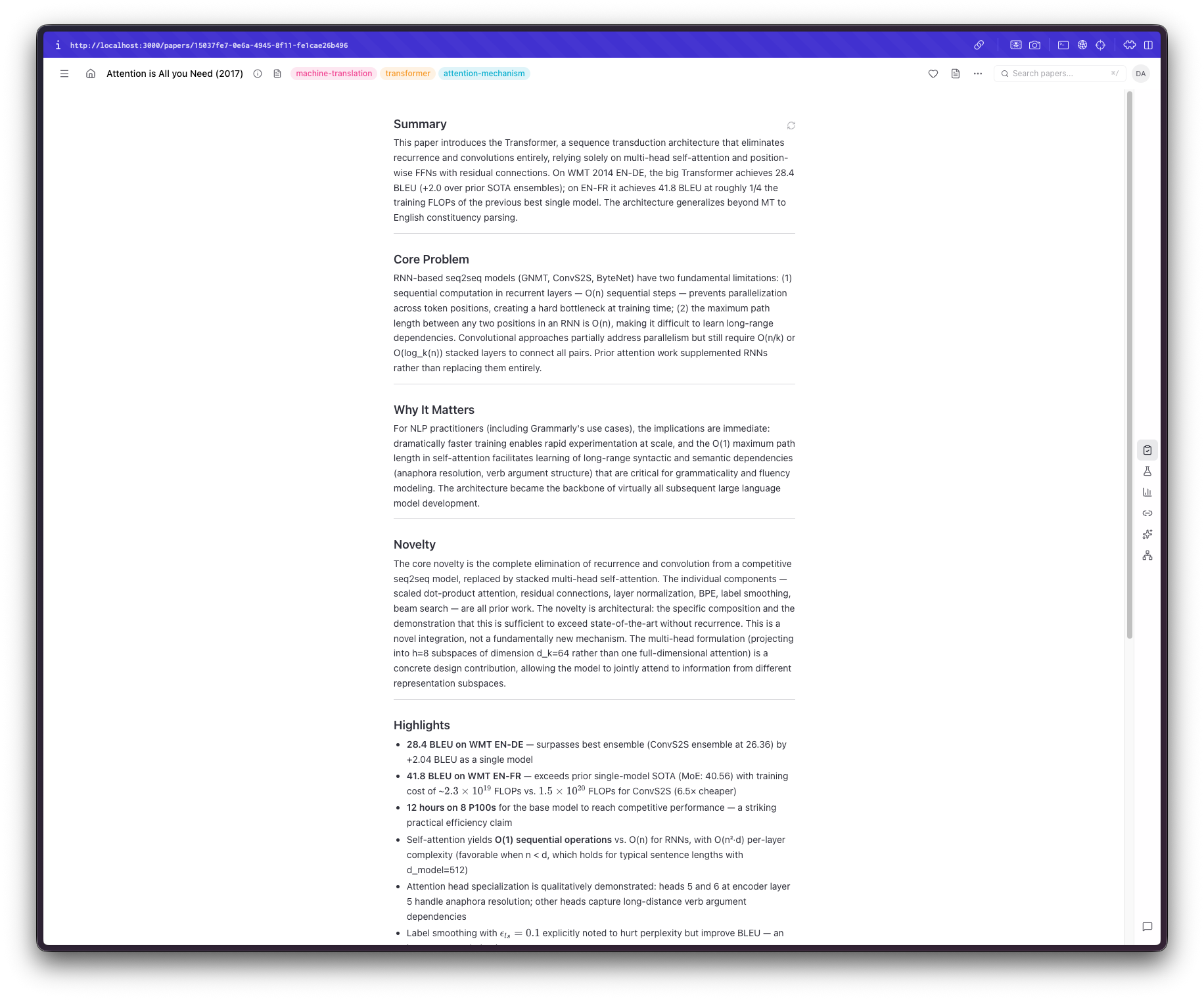
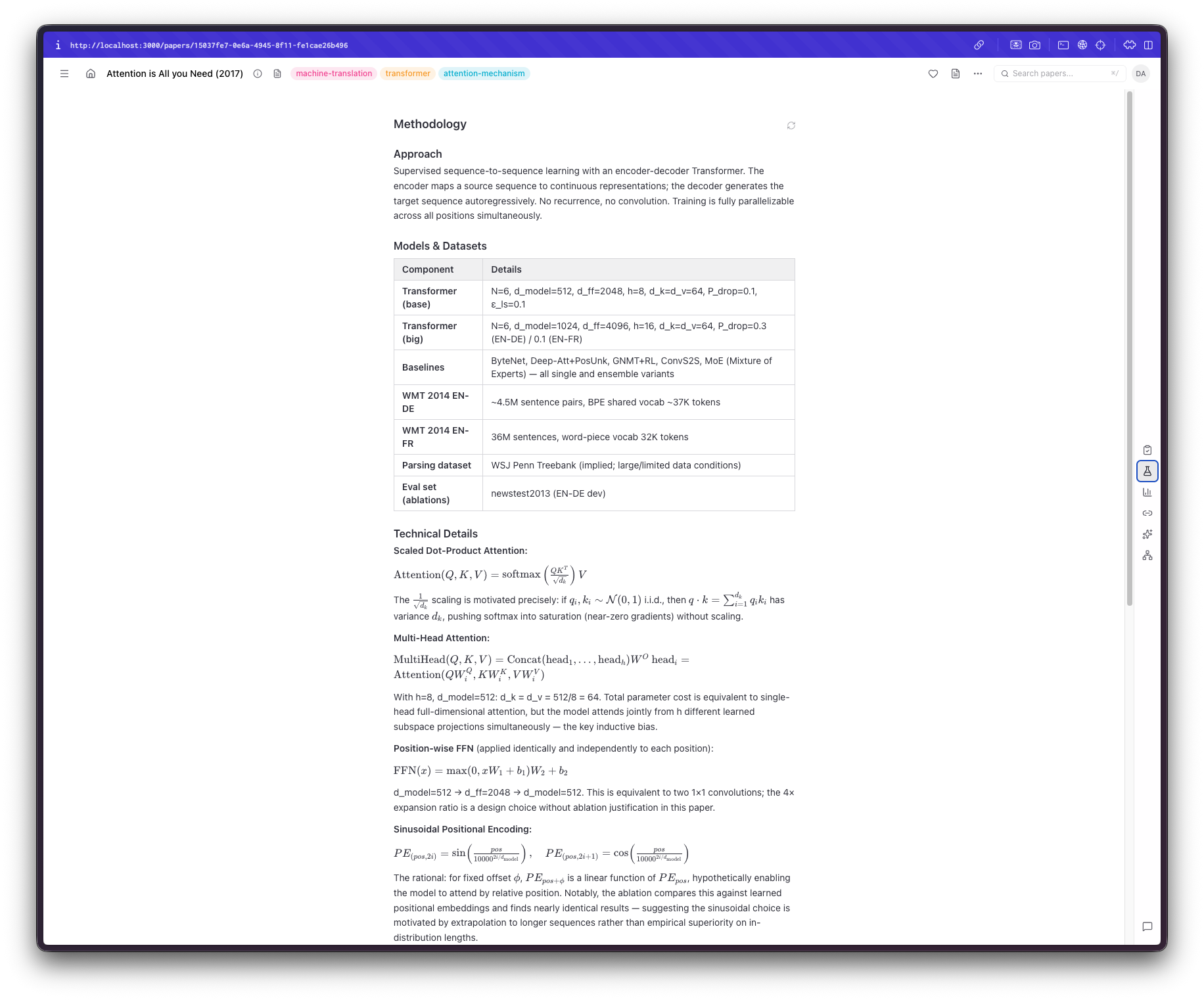
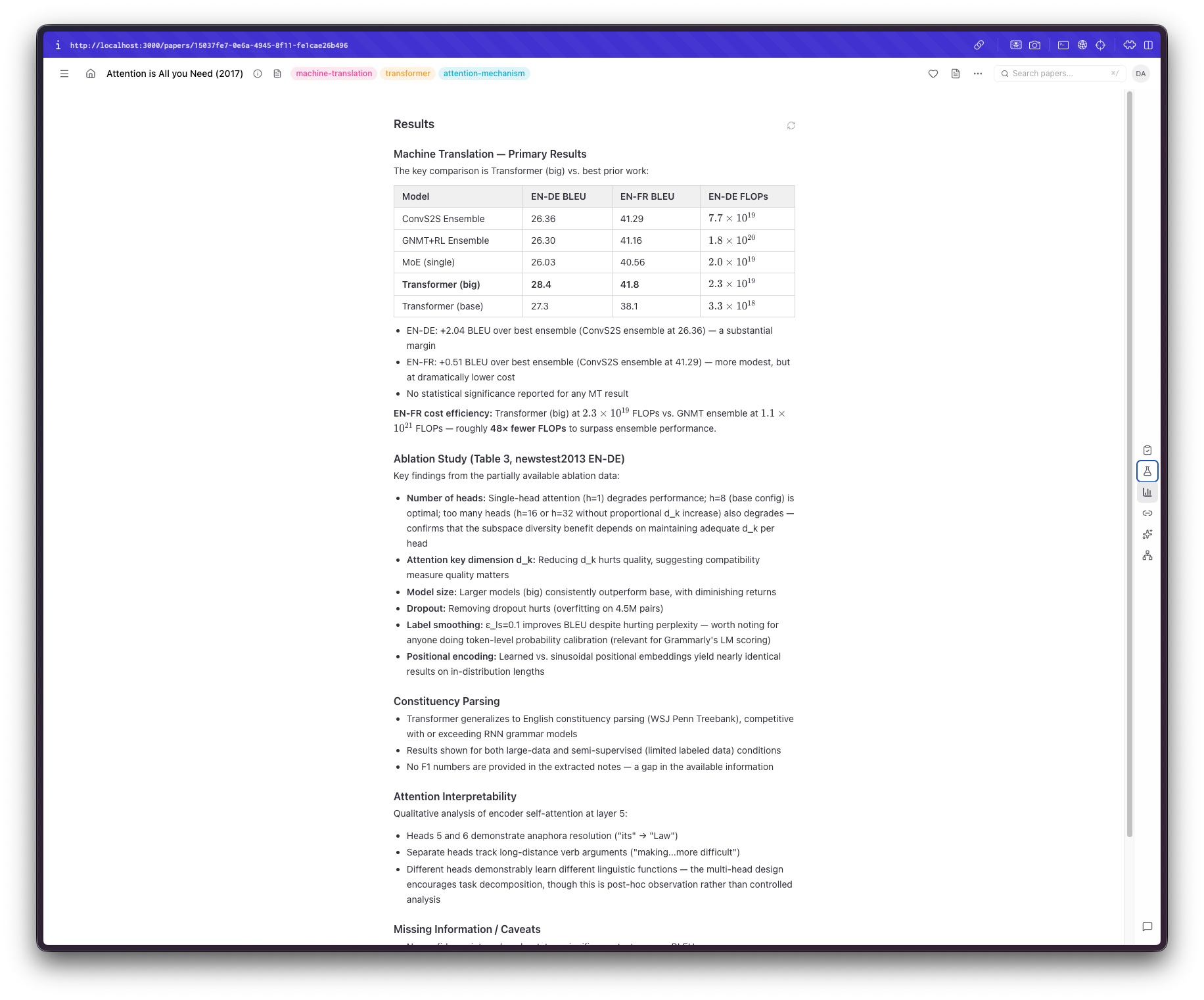
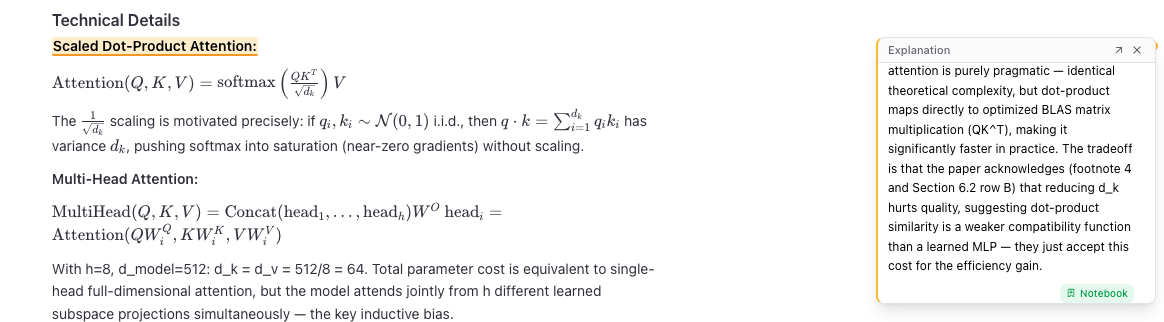
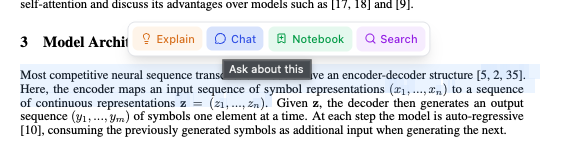
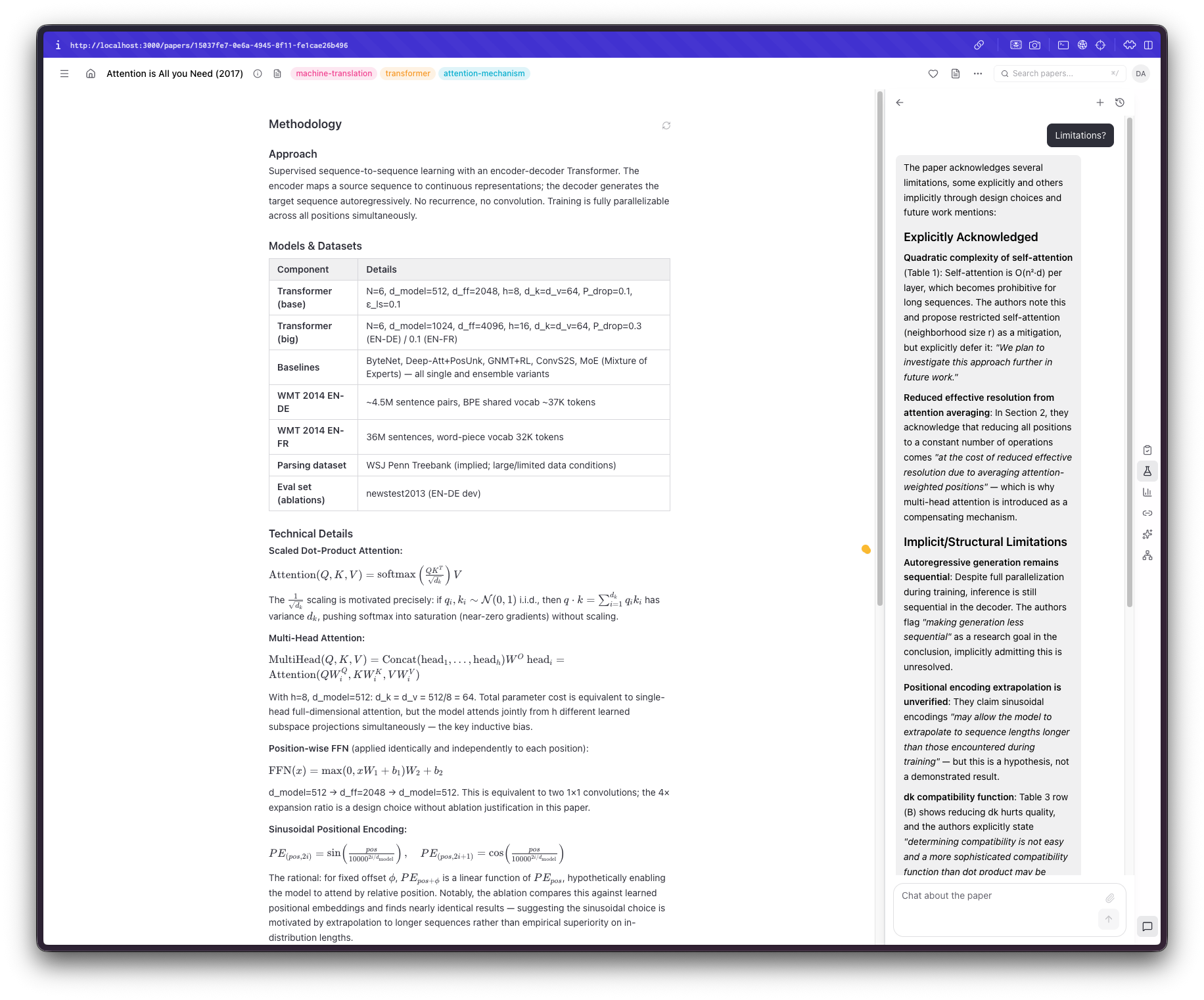
However, we live in the AI age now. I also wanted a way to be able to interact with the output, ask questions, have things explained, and even "store" some things I found interesting and useful; not merely do something I could've done by copy/pasting the link to the paper. For example, if I am not familiar with a technique or an acronym, I would like it promptly explained. If there is anything not included or needs clarification, have an immediate way of understanding it. If I want the system to expand on something, I would be able to do so easily.
So I came up with a simple set of "tools": explain, chat, search, and add to notebook. Each of those would query the LLM, optionally taking some context, to help me understand something relevant to the paper. I also branched off "chat" into a separate tool so I could interact with the paper much like I can with Gemini. Adding a "notebook" feature was also a really nice addition, since I no longer have to keep track of separate notes in Bear. What tested the limitations of Claude, though, was to be able to also do this using the PDF, too.
Importing papers
Now that I have the core capabilities I wanted ready, I needed a way to import papers easily. Claude, by default, added a few ways I would never use, like locating PDFs from my laptop, so I started by asking it to build a browser extension that would work on my most visited websites (e.g., arXiv, *cl, openreview, as well as when I have a PDF open), would locate the PDF and import it. This took a lot of fine-tuning and is constant work, but so far it works mostly well. Depending on the website, it can even locate figures, tables, references, and even the actual text, so I wouldn't need to parse the PDF, which is very helpful. I also added batch import functionality that takes a BibTeX file, locates the papers online, and adds them to Arcana using the Batch API to keep costs low (see below).
Making connections
At this point, I had everything I needed to get up to speed quickly on what I had missed. There was still a lot of manual work involved, but at this stage, I was able to build a habit around this way of reading.
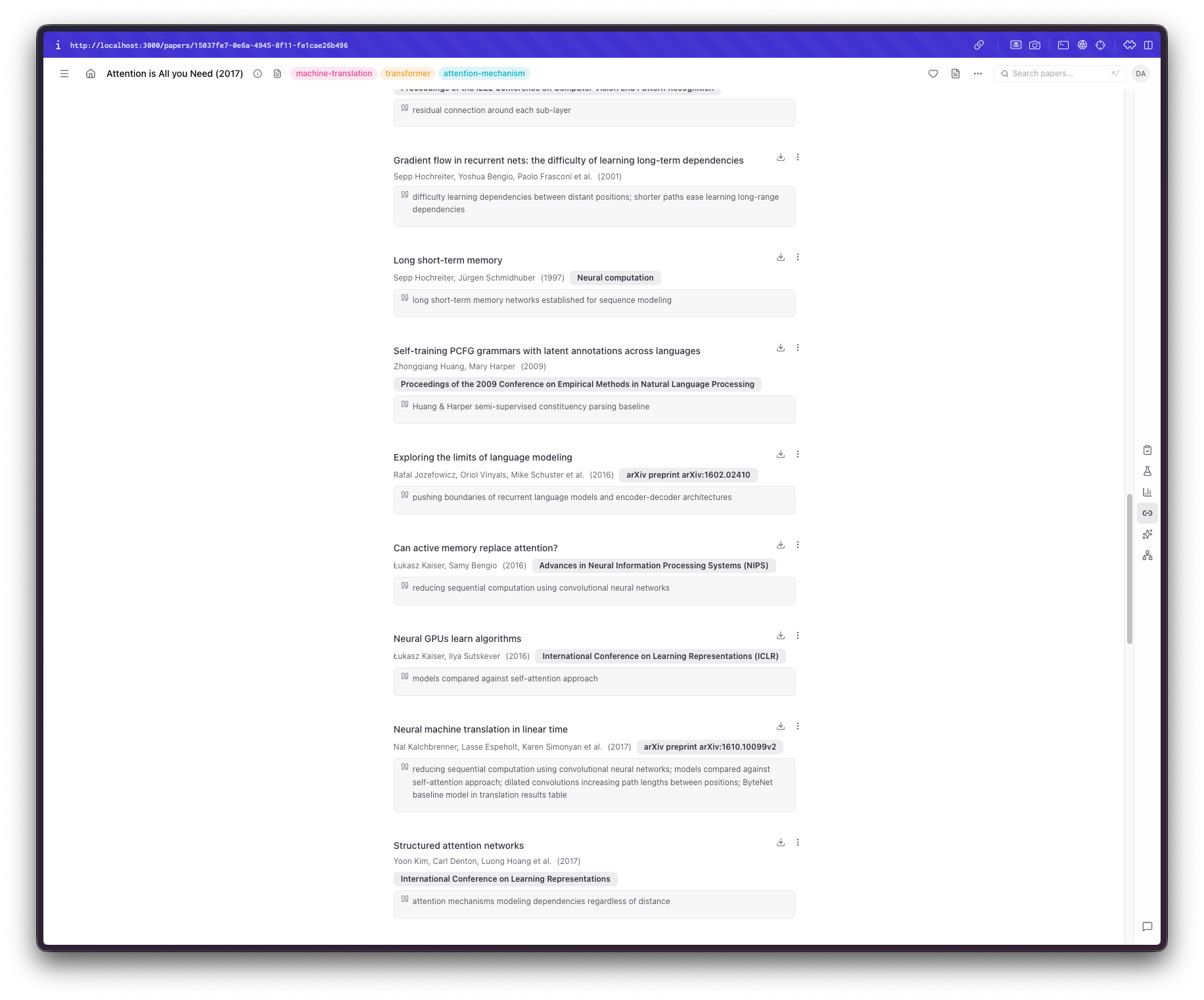
Then I noticed another thing that has always annoyed me when I come across a paper with 50+ references: I see a reference I am interested in, but cannot, for the life of me, figure out exactly where it was mentioned in the paper. This called for an interesting feature where Arcana would extract references, find where they occur in the text, and then summarize their context and why they are mentioned. This had a nice side effect: when I saw a random paper on my list that I didn't really recognize, I could figure out why I'd added it in the first place.
 alt text
Analyze
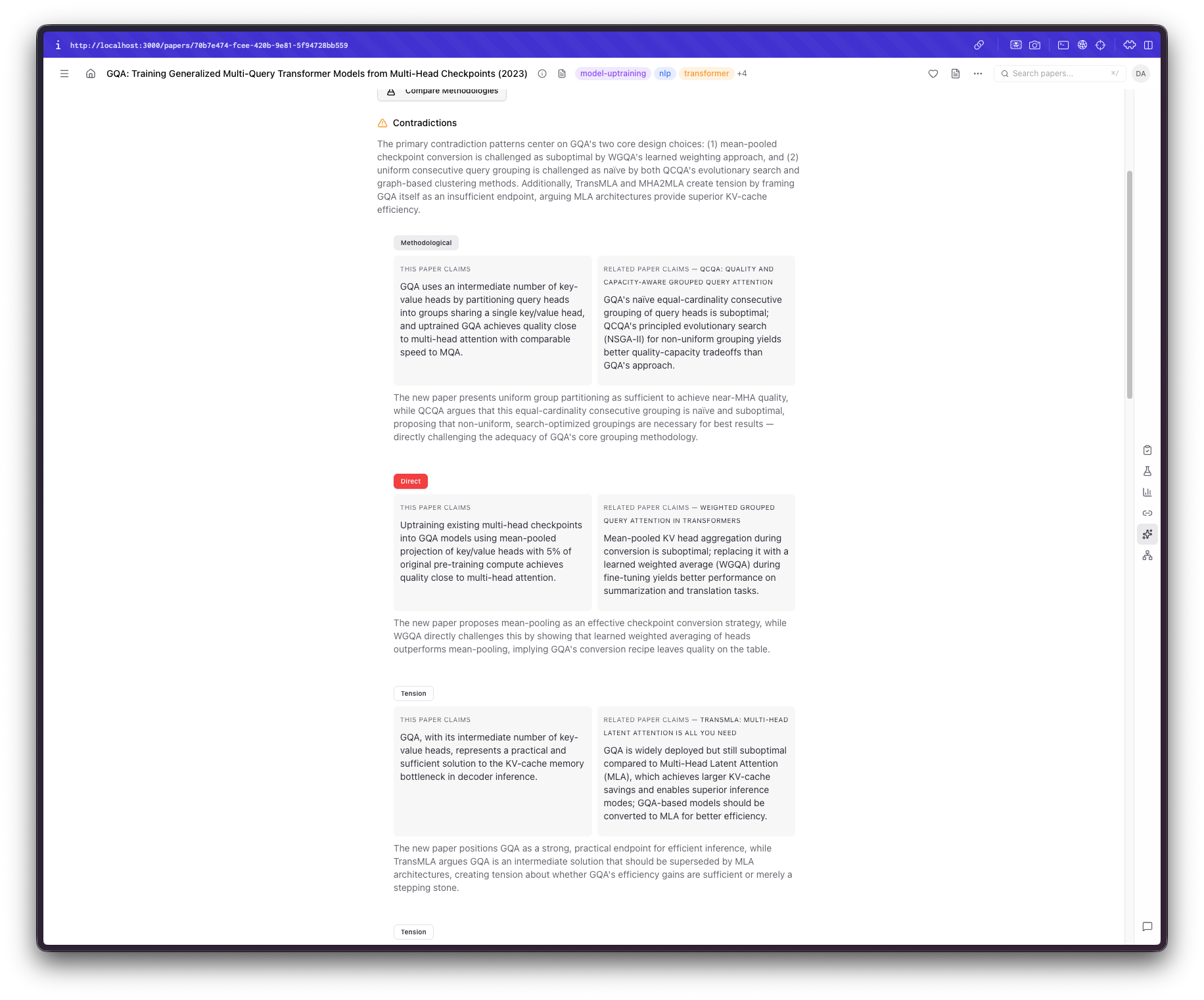
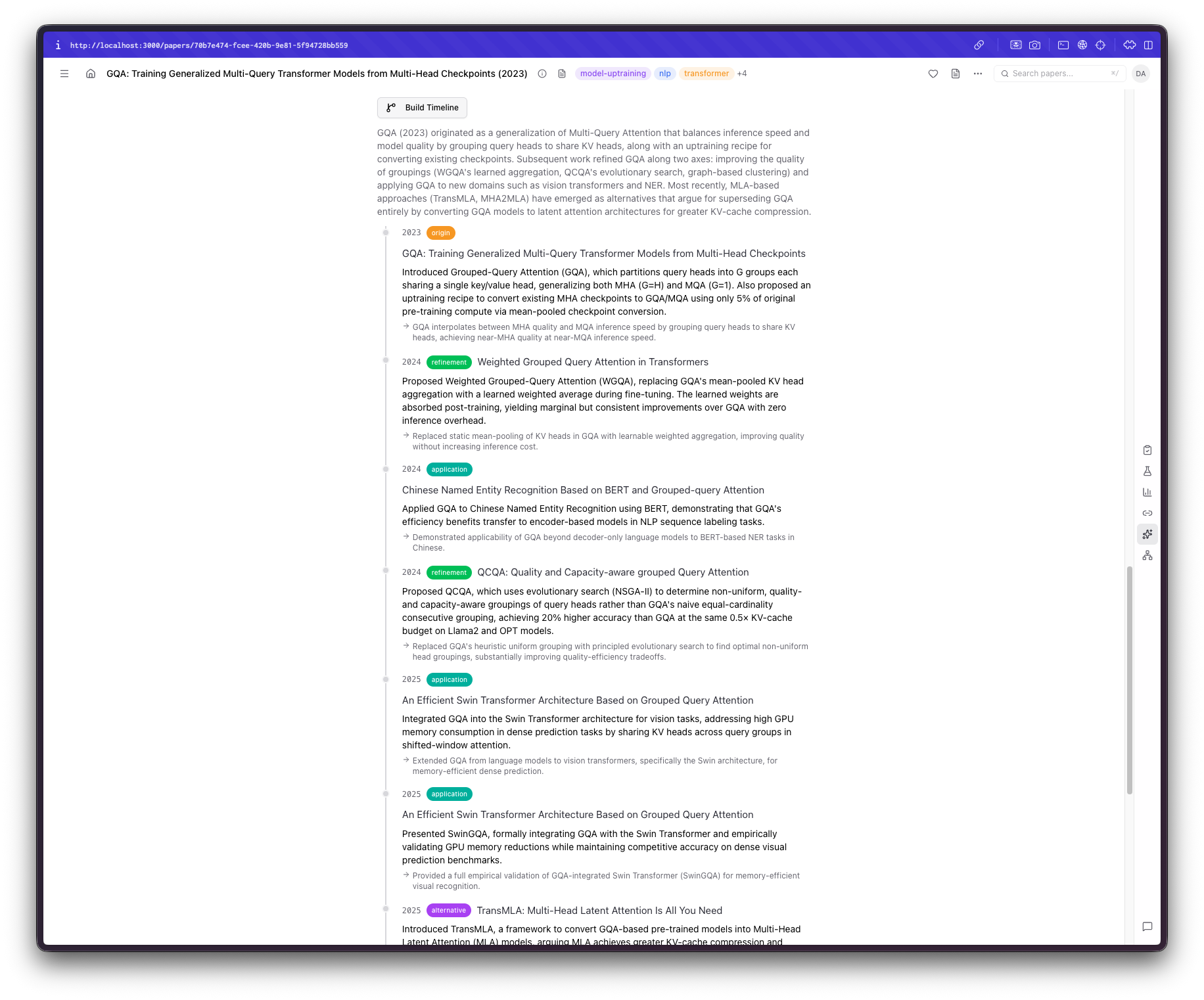
Now that I had a way to make connections between papers, things became even more interesting. The first feature I thought could help me would compare papers on their methodologies, claims, or results. Sure enough, that was the first thing I added: a way to get contradictory claims from similar papers. Reality check: Claude (or even GPT for that matter) does not 100% understand the context or the actual claims in some grander scheme of things, so they are prone to overstating some differences, but aside from this, it can make comparisons I didn't think I would make, which is always welcome. Another feature that would be more successful, at least in my opinion, that I wanted to add was a way to see the evolution of some ideas. Very often, when I start a new topic, I seem to skip some earlier, core paper I should've read. So, I added an "Idea Timeline" section that takes into account publication year and content, identifying dependencies, extensions, and derivatives of each work.
Making sense of the chaos
I really dislike categorizing; having to categorize 100 papers into ten groups is a nightmare scenario for me. I would either worry that papers in one category are not that similar to be bundled together, ending up with almost the same number for papers and categories, or, to avoid this, include marginally relevant papers in the same category, ending up with something like "nlp" or "ml" as categories. I did not think this would be very useful, so I needed to brainstorm a bit more here. I thought of using tags, but doing so, I feared, would pose a very similar problem. I ended up with a bottom-up tag approach where Arcana periodically re-evaluates the tags to make them maximally specific. This addition required extensive tuning and manual changes to work well.
Keeping costs down
Obviously, something like this would increase my LLM costs by a lot. If doing all of that is going to cost me a fortune, thanks but no thanks. I figured that given the size of my library and the number of papers I expect to process every day, if I manage to keep the average cost of one paper in the $0.01-$0.05 range, I'd be fine. My "algorithm" included how much would an off-the-shelf solution cost vs how many papers I expect to be processing on a daily basis. Papers costs $5.42/mo which would mean 542 papers/month with fewer features and still way beyond my more realistic 100 papers/month expectation. That being said, keeping the costs down meant quite I had to keep an eye out for a few things:
- Deferring to simpler/classical approaches wherever possible. For example, extracting references does not require a separate call for the entire paper since these are mostly available online or easily parseable.
- The task is not so heavy reasoning-wise, so a cheaper model like Sonnet 4.6 would be more suitable here and, in fact, it actually does an excellent job (frankly, I haven't even tried something like Haiku or the *-mini lineup from OpenAI).
- Batch processing. Probably the simplest way to slash costs by half would be to simply use a Batch endpoint (offered both by Anthropic and OpenAI). This obviously would not work on a "I want results here and now" situation, but, frankly, this is hardly ever the case. In this case, might as well read the paper itself instead of processing it. Usually, I'll spend some time looking for papers, or, as we saw before "Save them for later". In these cases, batch processing is easy. If you import a large number of papers in a short period of time, the system smartly activates the batch processing mode in which case you'd need to wait for a bit more time slashing costs by half.
I ended up with an average cost* of about $0.01-$0.02 per paper which I thought good enough for now (although I do have some ideas how to bring this down even more).
If you made it up to here, thank you for keeping up with my rambling. Stay tuned for Part II on how I added an agentic component to perform ML research (it's actually quite fun). You can try out the app here.